The 7 Key Types of Python Operators
Master the Building Blocks: An Overview of Python Operators
The 7 Key Types of Python Operators
Master the Building Blocks: An Overview of Python Operators , Mar-18-2026
Master the Building Blocks: An Overview of Python Operators
In our last lesson, we introduced Python as a powerful, beginner-friendly language. We learned about variables and basic data types like integers and strings. Now, it's time to put that data to work.
How do we actually perform actions on our data? How do we compare values, combine conditions, or assign new values to a variable? The answer is: Operators.
In Python, operators are special symbols or keywords that are used to carry out specific operations on values and variables. You can think of them as the mathematical verbs in the language.
Today, we will take a bird's-eye view of all the fundamental types of operators that Python uses.
The 7 Key Types of Python Operators
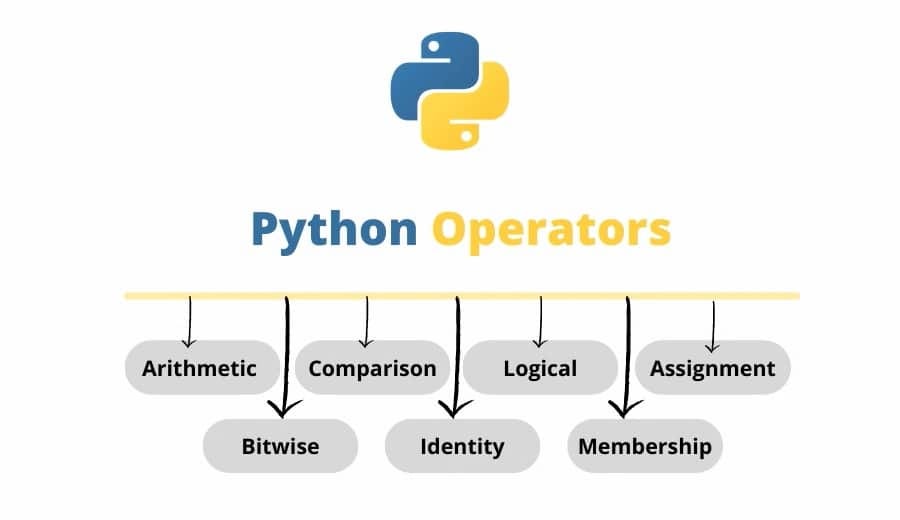
As shown in the image, Python categorizes operators into seven major groups, each with a distinct purpose. While we will cover each in detail in future articles, here is a breakdown of what they do:
1. Arithmetic Operators
These are the mathematical workhorses. You are already familiar with most of them from school. They are used to perform mathematical operations with numbers (integers and floats).
Purpose: Perform basic math.
Examples:
+(Addition),-(Subtraction),*(Multiplication),/(Division),%(Modulus - finds the remainder),**(Exponentiation - powers),//(Floor Division - division that rounds down).
2. Comparison (Relational) Operators
These operators are used to compare two values. They are essential for decision-making in your code. A comparison operation always results in a Boolean value: either True or False.
Purpose: Determine the relationship between values.
Examples:
==(Equal to),!=(Not equal to),>(Greater than),<(Less than),>=(Greater than or equal to),<=(Less than or equal to).Key difference for beginners: Use
==to check if values are equal, but use=to assign a value to a variable.
3. Logical Operators
These operators allow you to combine multiple comparison conditions. They act like logical connectives. Like comparison operators, they result in a True or False value.
Purpose: Combine multiple conditions.
Keywords:
and,or,not.
4. Assignment Operators
We have already used the most common one: the single equals sign =. This operator is used to assign a new value to a variable. This category also includes clever "shortcut" operators that combine a math operation with an assignment.
Purpose: Store a value into a variable.
Examples:
=(Simple assignment),+=(Add and assign),-=(Subtract and assign),*=(Multiply and assign).
5. Bitwise Operators
These are more advanced and are rarely needed in simple scripts. Instead of working on numbers like 10 or 15, they perform operations at the "binary" level—on the raw sequence of 1s and 0s (bits) that represent the numbers inside the computer.
Purpose: Perform operations directly on bits (binary representations).
Examples:
&(AND),|(OR),^(XOR),~(NOT),<<(Left shift),>>(Right shift).
6. Identity Operators
These are unique to object-oriented languages like Python. They do not compare values but rather compare the identity of objects. This means checking if two different variable names point to the exact same physical memory location in the computer.
Purpose: Check if two objects are the same entity.
Keywords:
is,is not.
7. Membership Operators
This is one of Python’s most elegant features. It allows you to quickly check if a certain element exists within a collection, such as a sequence of text (a string) or a list.
Purpose: Test for presence within a sequence.
Keywords:
in,not in.

The goal of this article is to introduce you to the full toolbox. We will be taking a deep dive into Arithmetic and Comparison operators next, as these are the tools you will use in almost every single script you write as a beginner. For more tutorials and practical Python guides, keep learning with us at TeachLive.in. If you found this chart helpful, don't forget to bookmark this page for your reference. Happy coding!
Popular
- Operators In Python
- What Is Purpose Of Operators In Python
- Gagan Khanna
- 9312352488
Shopeze.in
Boost via Reels & Images
Learn Python By Gagan Khanna
Professional Help for Growth
Tags
Operators In Python What Is Purpose Of Operators In Python Gagan Khanna 9312352488 The 7 Key Types Of Python Operators Arithmetic Operators Comparison (Relational) Operators Logical Operators Assignment Operators Bitwise Operators Identity Operators Membership Operators